
Infiniti G35 Sedan 2005-2006 V.3 Fusion Color Change LED Halo Headlight Kit with Wifi Remote
In stock
Only %1 left
SKU
IN-G35S0608-V3HWI
From $189.00 - $298.00
As low as
$248.00
Transform your Infiniti G35 Sedan (2005-2006) with the V.3 Fusion Color Change LED Halo Headlight Kit featuring WiFi remote control. Experience ultimate customization with Flashtech's advanced halo technology, allowing you to change colors effortlessly at the touch of a button or via smartphone app. This all-inclusive kit comes with vehicle-specific components, external LED drivers for easy installation, and a reliable RF remote for up to 100 feet of wireless control. Upgrade your headlights today and stand out on the road!
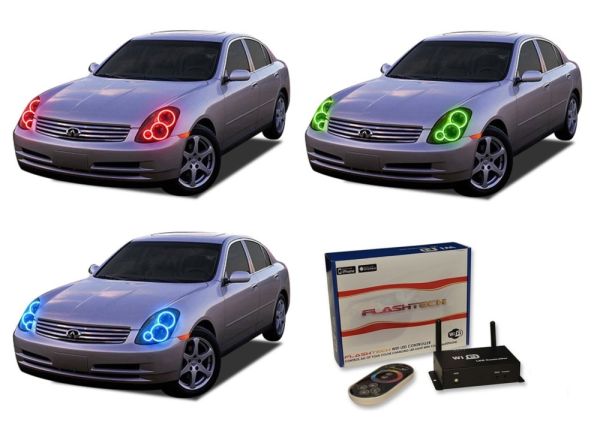
Infiniti G35 Sedan 2005-2006 V.3 Fusion Color Change LED Halo Headlight Kit with WiFi Remote
Transform your Infiniti G35 Sedan into a stunning spectacle with the V.3 Fusion Color Change LED Halo Headlight Kit. Engineered by Flashtech, this state-of-the-art halo kit addresses the desires of automotive enthusiasts seeking both style and functionality. Enjoy the freedom of complete halo customization at your fingertips, ensuring your vehicle stands out on any road.
Key Benefits and Features:
- Ultimate Color Customization: Choose from an almost limitless color palette with the smartphone app or the included RF remote.
- Easy Installation: Plug-and-play design ensures a straightforward installation process, with detailed instructions provided.
- Smartphone and RF Control: Control your halos from your smartphone or via a wireless RF remote with a range of nearly 100 feet.
- Durable Components: Designed specifically for the Infiniti G35 Sedan, ensuring a perfect fit and long-lasting performance.
What's Included:
- Vehicle Specific Components: Infiniti G35 Sedan 2005, 2006
- (2) V.3 Fusion Color Change Low Beam Halo Rings
- (2) V.3 Fusion Color Change High Beam Halo Rings
- (2) External LED Drivers
- (1) WiFi Remote
- (1) Complete Wiring and Installation Guide
- Everything you need to add Halos to your existing headlights
Installation Details:
The installation of the V.3 Fusion Color Change LED Halo Headlight Kit is designed to be user-friendly, making it accessible for both DIY enthusiasts and professionals. While many customers successfully install this kit themselves using the provided wiring and installation guide, we recommend hiring a professional if you're not comfortable working with automotive electronics. Enjoy the glow and customization that this kit brings to your Infiniti G35 Sedan!
| Flashtech | Flashtech |
|---|
Write Your Own Review
Browse all of the great images that have been uploaded by our customers and get inspired! To upload your own images, simply follow the instructions on this tab.
