
V.3 Fusion Color Change WIFI Controller
Control your RGB LED lights effortlessly with the V.3 Fusion Color Change WIFI Controller by Flashtech. Featuring a wireless RF Colorwheel remote and the Magic Color 3.0 app for Android and iPhone, this powerful controller offers a full color spectrum, 10 preset modes, and a remote range of over 75 feet. Perfect for any 4-wire RGB setup, it provides easy wiring with universal screw terminals. Elevate your lighting experience today!
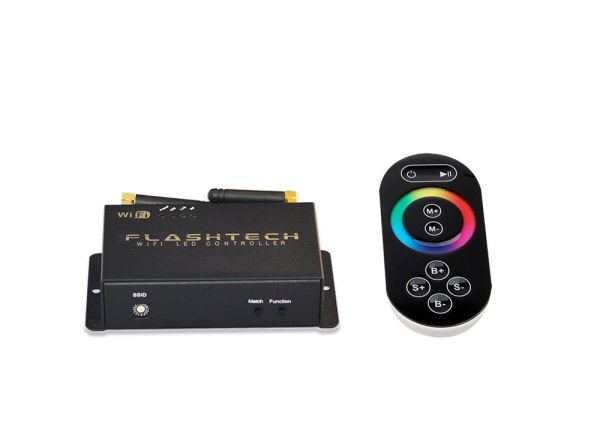
V.3 Fusion Color Change WIFI Controller
Transform your lighting experience with the Flashtech V.3 Fusion Color Change WIFI Controller. Designed for automotive enthusiasts and lighting aficionados, this advanced controller allows you to effortlessly manage a variety of RGB LED light sources. Whether you prefer the convenience of a remote control or the sophistication of a smartphone app, the V.3 Fusion has you covered.
Key Benefits & Features:
- Control your RGB LED lights using a wireless RF Colorwheel remote or the intuitive Magic Color 3.0 smartphone app.
- Access the entire color spectrum with a custom color wheel for personalized lighting effects.
- Choose from 10 preset modes, including 7 vibrant colors and 3 dynamic flashing and blending modes.
- Enjoy a remote range of over 75 feet for convenient operation from a distance.
- Easy wiring with universal screw terminal connections compatible with all Flashtech color-changing LED products.
- Robust performance with a working temperature range of -4°F to 140°F and output power of up to 144W.
What's Included:
- V.3 Fusion Color Change WIFI Controller
- Wireless RF Colorwheel Remote
- Magic Color 3.0 Smartphone App (available on Android and iOS)
- User Manual
Installation Details:
Installing the V.3 Fusion Color Change WIFI Controller is a straightforward process thanks to its user-friendly design and universal screw terminal connections. While many users can handle the installation themselves, we recommend hiring a professional for optimal setup, especially if you're unfamiliar with electrical installations.
Follow the included user manual for step-by-step guidance, and ensure that your RGB LED setup meets the required specifications to enjoy the full benefits of this powerful controller.
| Flashtech | Flashtech |
|---|---|
| Connection Type | Screw Terminal |
| Controller | WIFI |
| Remote | RF Touch Color |
| Color | RGB |
Write Your Own Review
Browse all of the great images that have been uploaded by our customers and get inspired! To upload your own images, simply follow the instructions on this tab.
